Tasks and reminders
Keep household responsibilities and recurring jobs visible.
From Microsoft 365 and business IT to Wi-Fi, computer repairs, and home technology, get reliable expert support without lock-in contracts or monthly retainers. With transparent pricing, a No Fix, No Fee guarantee, and 100% ad-hoc service, you only pay for the help you need, when you need it.
Clear help, flexible service and no unnecessary monthly commitment.
If we diagnose a software glitch or hardware issue and it proves unfixable, you pay absolutely nothing. Zero risk, zero stress — you only ever pay when there's a genuine result.
Total budget control. No minimum monthly retainers, no fixed package clutter, and no hidden fees. You only pay for the exact assistance you request, when you request it.
Your schedule rules. We coordinate remote or on-site visits around your day — including evening and weekend availability — to minimise household or business downtime.
One reliable contact for home technology, small-business systems and digital projects.
No call centres, no ticket queues, no jargon. Just a clear, honest process from first contact to fixed.
Send a short description of the issue, setup or improvement you have in mind.
We review the situation and explain the practical options before work begins.
Remote or on-site, business hours or weekends. You choose the time that minimises your downtime.
No Fix, No Fee. No contracts. You pay only for the assistance you actually received.
Work with one experienced IT professional who explains the problem clearly and stays focused on the result.
Founder-led support backed by a Bachelor of IT plus CCNA, Azure, Microsoft 365, AWS and ITIL certifications.
Focus on the underlying cause rather than applying a quick temporary patch.
Clear explanations and honest recommendations without confusing technical language.
Ad-hoc support and transparent approval before work, without unnecessary retainers.
Personal review of requests, with remote resolution available for many common issues.
Local service with a focus on Western Sydney and the Parramatta region.
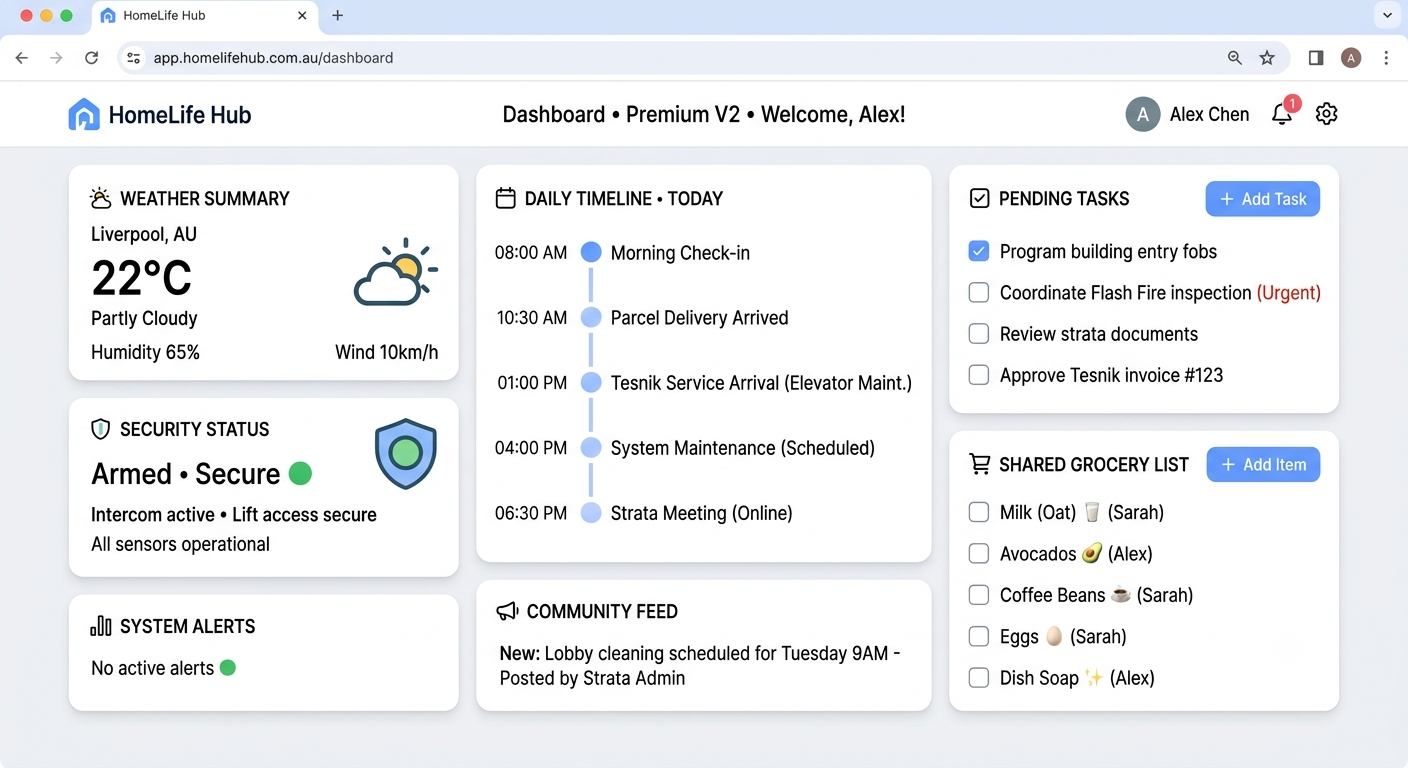
A private household dashboard for tasks, routines, groceries, reminders, property information and everyday home management.
HomeLife Hub is designed for the everyday information and routines that are often spread across notes, calendars, messages and different applications.
Keep household responsibilities and recurring jobs visible.
Maintain practical lists for everyday household needs.
Organise useful information about assets, warranties and maintenance.
Track household and personal routines from one dashboard.
Clear steps for common Sydney home and small-business technology problems.
Test beside the router, compare Wi-Fi with a wired connection if possible, then restart the NBN box and router once.
Mesh can help larger or multi-storey homes, but cannot repair weak NBN service. If wired speed is healthy but rooms have dead zones, a measured Wi-Fi survey is the useful next step.
Give staff a simple way to report suspicious messages. Review users, devices, sharing links, mailbox rules, and recovery details quarterly.
Real results for real homes and businesses across Greater Sydney.
Naresh sorted our office Microsoft 365 and locked down every laptop with Intune in an afternoon. No contract, no fuss — exactly what a small business needs.
Our Wi-Fi finally reaches every room and the kids' parental controls actually work. He explained everything in plain English. Highly recommend.
Built me a custom PC that runs flawlessly and did not try to upsell parts I did not need. Genuinely knows the engineering side. Will use again.
Tell us what is not working, what you want to improve or what you are planning to set up.
A private household dashboard for tasks, routines, groceries, reminders, property information and everyday home management.
HomeLife Hub is designed for the everyday information and routines that are often spread across notes, calendars, messages and different applications.
Keep household responsibilities and recurring jobs visible.
Maintain practical lists for everyday household needs.
Organise useful information about assets, warranties and maintenance.
Track household and personal routines from one dashboard.
A clear dashboard can bring tasks, weather, security status, reminders and shared household planning into one practical daily view.
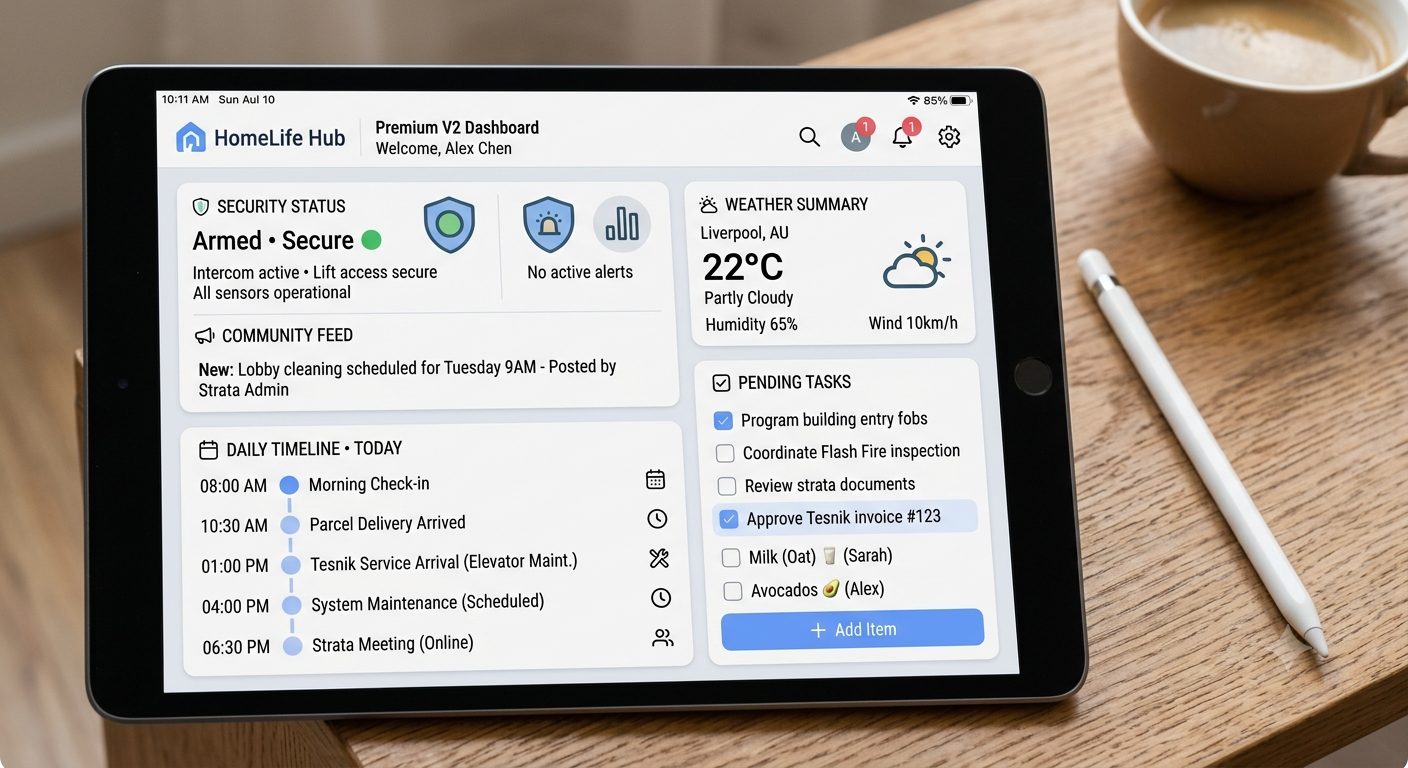
Instead of a generic productivity layout, HomeLife Hub can reflect actual household use cases like shared groceries, pending tasks, community updates and home records.
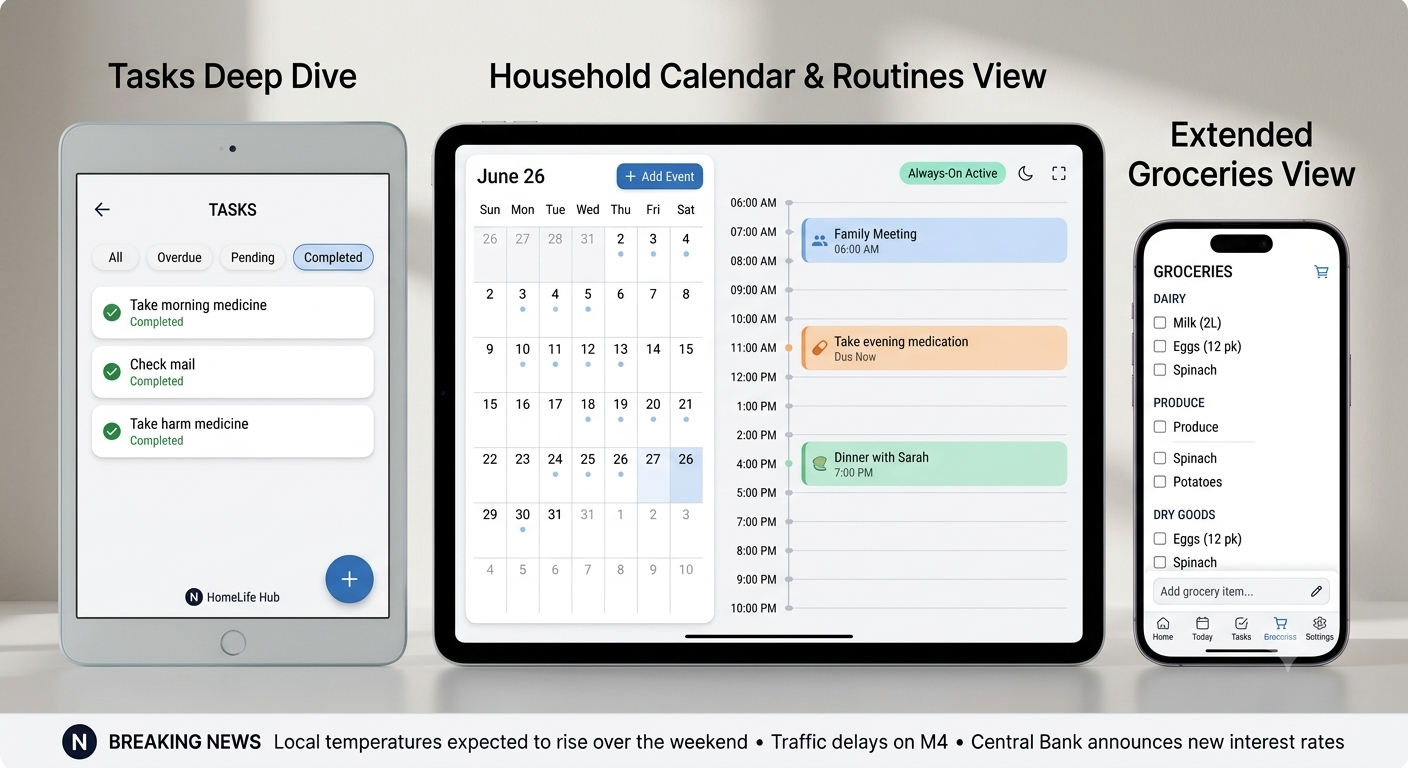
Visit the dedicated domain for product updates as the public website is prepared.
Open HomeLife Hub →Choose the support area that best matches what you need. Every project begins with a clear assessment and approval before work starts.
Practical support for connectivity, devices, repairs, security, smart-home setups and family technology.
Diagnose unreliable connections, improve router placement and configure the right network for your home.
Improve coverage, reduce dead zones and configure devices correctly.
Separate connection problems from Wi-Fi problems and identify the practical next step.
Reliable video calls, printers, VPN access and work-from-home equipment.
Safer passwords, guest networks, firmware checks and sensible device separation.
Troubleshooting and practical improvement for Windows computers, laptops, peripherals and common software issues.
SSD, memory and setup improvements where the upgrade makes financial sense.
Remove unwanted software, improve security and restore normal performance.
Accounts, updates, applications, backups, email and secure transfer of information.
Independent component selection and custom PC planning based on real needs.
Setup and troubleshooting for smart-home devices, cameras, lighting, voice assistants and family controls.
Connect compatible lighting, cameras, plugs and voice assistants.
Age-appropriate device settings, family accounts and network-level controls.
Simple backup plans for family documents, photos and important device data.
Choose compatible products before spending money on the wrong equipment.
Flexible help for small teams that need professional IT support without a large managed-services contract.
Support for business email, accounts, Microsoft 365 applications, SharePoint, OneDrive and user access.
User setup, email, licences, groups, permissions and day-to-day configuration.
Create secure access for new starters and remove access properly when people leave.
Improve storage, sharing, permissions and everyday collaboration.
Resolve common software and configuration problems quickly and securely.
Improve core security, business connectivity and recoverability without unnecessary complexity.
Device policies, security baselines and remote protection for compatible business devices.
Routers, switches, VPN access, printers and tidy small-office network design.
Review, configure and test backups for critical business information.
MFA, access reviews, account hygiene, patching and practical staff awareness.
Review recurring issues, software subscriptions, risks and manual processes to create a realistic improvement plan.
Identify support risks, security gaps, ageing devices and avoidable cost.
Independent guidance on software, hardware, internet and cloud options.
Practical records for systems, devices, subscriptions and important support details.
Prioritise the changes that matter now and defer what can safely wait.
Build or improve the customer-facing and internal tools that support your business.
Website design and refreshes for small businesses, including practical setup of domains, contact forms and email.
Responsive websites focused on clarity, trust and useful customer actions.
Improve outdated design, mobile behaviour, accessibility and content structure.
Connect domains, DNS, professional email and essential security records.
Working enquiry forms, basic analytics and practical conversion tracking.
Connect common tools and simplify small, repetitive processes without building an unnecessarily complex system.
Route enquiries, requests and reminders to the right people and systems.
Practical Power Automate and Power Apps solutions for suitable small workflows.
Use approved AI tools for drafting, triage, knowledge organisation and repetitive tasks.
Identify where existing tools can share information and reduce duplicate entry.
Book a free initial assessment and we'll figure out the smartest, most budget-friendly path together.
1Touch IT exists to deliver practical support without lock-in contracts, confusing jargon or faceless call-centre handoffs. The business is built around a simple idea: technology help should be clear, honest, useful and easy to access when people actually need it.
Across home technology, small-business systems and digital projects, the focus stays on practical outcomes: improve reliability, reduce frustration, protect what matters and recommend only what is genuinely useful.
1Touch IT supports homes and small businesses across Greater Sydney, including Western Sydney and Parramatta, with remote support available where appropriate. Founder experience remains part of the story, but the website is designed to lead with what the company does and how it helps.
Read the founder background as a secondary reference while the main website stays focused on the business, the services and HomeLife Hub.
No complex contracts. Tell us what's broken or needs setting up, and we'll handle the rest on a strict No Fix, No Fee basis.
Reach out and 1Touch IT will personally review your request, usually within a few hours.
Thanks for reaching out. 1Touch IT will review your request and get back to you shortly, usually within a few hours.
The founder perspective behind 1Touch IT, including the service mindset, technical background and experience that shape how the business supports clients.

1Touch IT is shaped by experience across technical support, end-user computing, Microsoft 365, Azure, networking and day-to-day IT operations. That background helps the business approach problems with a balance of structure, responsiveness and plain-language communication.
The founder view behind 1Touch IT is simple: support should feel personal, clear and outcome-focused. The aim is not to overwhelm clients with technical language, but to make the right decisions easier and the right solutions more reliable.
Formal study and certifications remain part of the technical foundation, but the real value comes from applying that experience in a practical way for homes, small businesses and digital projects across Greater Sydney.
A practical mix of cloud, support, infrastructure, systems administration, and customer-facing IT skills.
Tenant administration, user access management, Azure Administrator Associate certified.
CCNA certified — LAN/WAN, routing, switching, Wi-Fi and VPN connectivity.
User accounts, permissions, group policy and access management.
Windows, macOS, Android and iOS support, deployments and troubleshooting.
Azure Backup, Veeam, data protection and disaster recovery setups.
ITIL Foundation — ticketing, incident resolution, documentation and SLAs.
Roles across technical support, desktop engineering, IT operations and user-facing service continue to influence how 1Touch IT supports clients today.
Use this page as a secondary reference while the main website remains focused on 1Touch IT services and HomeLife Hub.
Connect on LinkedIn →